
Opening Explorer vs Spaced-Repetition Trainer: Which Builds Your Repertoire Faster?

Disclosure: ChessAtlas is our product. We've aimed for a fair comparison, but readers should weigh our perspective accordingly. This article compares two methods: using an opening explorer (a research surface) versus a spaced-repetition repertoire trainer such as ChessAtlas. They solve different problems.
Serious opening prep needs reliable data and steady recall, and those are two different jobs. The benefit of spaced recall is documented in the spacing-effect meta-analysis by Cepeda and colleagues (2006), summarised on the spacing effect reference: review distributed over time produces stronger long-term memory than massed study. An opening explorer is a research surface; ChessAtlas is a focused retention trainer. See our opening trainer overview or 7 Best Chess Opening Repertoire Tools in 2026.
The short answer: use both methods. An opening explorer is the research environment; ChessAtlas is the personal-retention tool. Together they cover the full opening preparation workflow.
Quick Comparison
The table below sets the two methods side by side on the features that matter most for opening preparation. ChessAtlas concentrates on personal retention through scheduled review, while an opening explorer concentrates on research and analysis across one large database. Read each row as a question about your own workflow: do you need a billion-game record set, or do you need the handful of lines you actually play drilled until they stick? Most of the differences below trace back to that single distinction between a research database and a personal trainer.
| Feature | ChessAtlas | Opening Explorer |
|---|---|---|
| Spaced Repetition (FSRS) | Yes, built-in | No (manual review only) |
| Game Import | Yes, auto-sync from your play accounts (Plus/Premium) | Yes, PGN import |
| Repertoire Deviation Detection | Yes, automatic (Plus/Premium) | No (manual comparison) |
| Database Size | Built around your courses | Large master and online games set, filterable |
| Engine Analysis | Yes | Yes |
| Rating Filters | Via course content | Yes, filter by rating range and time control |
| Spaced-Repetition Scheduling | Adaptive FSRS queue | None (you revisit lines yourself) |
| Mobile | Web (mobile responsive) | Varies by platform |
| Pricing | Free tier; paid Plus/Premium plans | Often free |
The Real Problem: Research Without Retention Wastes Time
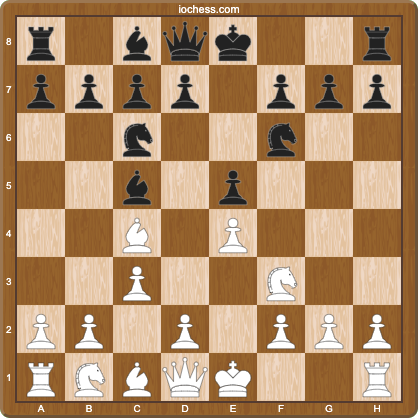
Here is a scenario familiar to most club players: you spend an hour researching the Italian Game in an opening explorer, check the online and master game records, find the Giuoco Piano line 1.e4 e5 2.Nf3 Nc6 3.Bc4 Bc5 4.c3 Nf6 5.d4 exd4 6.cxd4 looks promising, and resolve to play it. Three weeks later at the board, you remember almost none of it. That decline of unrehearsed recall over days is exactly what Ebbinghaus measured and what later memory studies have replicated.
This is not a willpower problem: it is a memory architecture problem. A database gives you data and a place to study it; a spaced-repetition system schedules each position so you actually remember it. The reason this works is the forgetting curve first measured by Hermann Ebbinghaus in 1885 and replicated by Murre and Dros (2015), the predictable decay of unrehearsed memory that scheduled review is designed to counter.
ChessAtlas: Built for Personal Retention

ChessAtlas is built around a single problem: you forget what you studied. Everything in the product, from courses to game import to deviation detection, feeds the spaced-repetition queue.
ChessAtlas Key Features
- FSRS spaced repetition: Reviews are scheduled at adaptive intervals using the Free Spaced Repetition Scheduler (FSRS), the same algorithm family used by language learners and medical students, tuned to chess positions.
- Automatic deviation detection (Plus/Premium): Import your games and ChessAtlas compares each move against your stored repertoire, flagging the exact move number where you or your opponent left it, with one-click "add to training" buttons.
- Purpose-built repertoire builder: Trees, transposition handling, and per-line priority controls.
- Course library: Pre-built repertoires you can fork, plus your own courses.
- Personal stats by line: Track which positions you keep getting wrong, not just overall accuracy.
ChessAtlas Pricing
ChessAtlas has a free tier that covers course building and spaced-repetition review at no cost. The retention extras, automatic game import and deviation detection, sit on the paid Plus and Premium plans, billed monthly or annually. You can build and drill a full repertoire on the free tier without paying anything; the paid tiers automate the post-game feedback loop rather than gating the core trainer. There are no per-course charges, so the cost is predictable as your repertoire grows.
ChessAtlas Pros
- Built-in FSRS scheduling so studied lines are retained over weeks and months.
- Automatic deviation detection pinpoints where your real games left prep.
- Dedicated repertoire builder with transposition handling and per-line priority.
- Per-position stats highlight your specific weak spots.
ChessAtlas Cons
- No multi-million-game record set for historical research (an opening explorer covers that better).
- No online play, no puzzles, no broadcasts.
- No native mobile app yet (the web app is mobile responsive).
- The most useful retention features (game import, deviation detection) sit on the paid plans.
Opening Explorer: A Research Surface

An opening explorer is a searchable database of games, usually part of a wider chess site, that shows how often each move has been played and how it scores. You can read more about online chess platforms that host these databases in general.
Opening Explorer Key Features
- Large database: Filter by rating range, time control, and player; switch between master and online game sets.
- Rating-specific stats: See what players at your level actually play, not just GM theory. Example query: "at 1500 Elo, what does White score after the Winawer French 3.Nc3 Bb4 4.e5 c5 5.a3 Bxc3+ 6.bxc3?"
- Engine analysis: Many explorers sit next to an analysis board so you can check evaluations as you browse.
- Move-frequency data: Win/draw/loss percentages for each candidate move at a glance.
- Fast research: Survey a whole opening tree in minutes.
Opening Explorer Pricing
Opening explorers are often free to use, since they are commonly bundled into a larger chess site as a research feature rather than sold on their own. Where a paid tier exists, it usually unlocks deeper filters or larger result sets rather than the core lookup. For most players, the lookup itself costs nothing, which is why an explorer is the natural first stop when researching a new line.
Opening Explorer Pros
- Large, filterable database with rating and time-control filters.
- Real-world move-frequency and scoring data, not just engine lines.
- Fast to survey an entire opening tree before committing to lines.
- Typically free for the core lookup.
Opening Explorer Cons
- No spaced-repetition scheduling for your own repertoire, so you revisit lines manually.
- No automatic comparison of your real games against a stored repertoire (no deviation detection).
- Personal repertoire workflows (transpositions, per-line priority, stats by your weak positions) are limited or absent.
- Showing you the data is not the same as making you remember it.
A Practical Workflow Example: Preparing the Caro-Kann
Suppose you decide to add the Caro-Kann (1.e4 c6 2.d4 d5) to your Black repertoire. Here is how you would use both methods optimally:
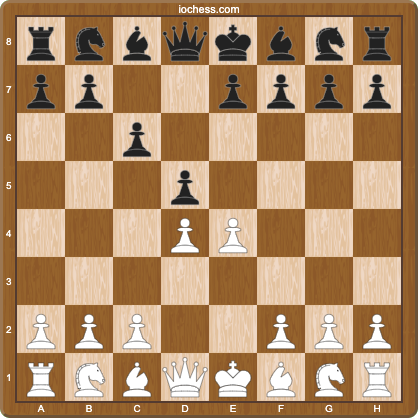
- Opening explorer first: Filter the explorer to your rating band. You discover that 3.Nc3 and 3.e5 are most common, with 3.Nd2 and 3.exd5 also frequent. The Classical with 3...dxe4 4.Nxe4 Bf5 scores well for Black at most rating levels.
- ChessAtlas to memorize: Build a course with your chosen lines: main lines for 3.Nc3, 3.Nd2, 3.e5, plus Exchange sideline coverage. Schedule daily 15-minute FSRS sessions.
- After your games: ChessAtlas' deviation finder (Plus/Premium) shows exactly which specific branches you are forgetting. Those positions get flagged for extra review.
This workflow is hard to replicate with either method alone. If you primarily play online, the loop tightens even more, see how automatic game import works in ChessAtlas.
When to Choose ChessAtlas
ChessAtlas is the right pick when your bottleneck is memory rather than information. If you already know which lines you want and simply cannot hold them at the board, a scheduled trainer addresses that directly. Consider it when the following describe you:
- You forget your lines under time pressure: spaced repetition is designed for exactly this, drilling each position right before you would otherwise forget it.
- You want to know exactly where your prep fails: deviation detection points to the move number and the position, so you fix the leak rather than re-reading whole chapters.
- You are 1200-2000 rated: structured per-position drilling tends to beat free-form study at this level, where forgetting is the main bottleneck.
- You have bought GM-authored courses but don't retain them: import your repertoire and drill it with FSRS so the investment actually sticks.
When to Choose an Opening Explorer
An opening explorer is the right pick when your bottleneck is information rather than memory, or when budget is the deciding factor. It shines in the discovery phase, before any lines are locked in, when you still want to see what real games say at your level. Consider it when the following describe you:
- You need deep statistical research: a large record set with rating filters lets you see real-world frequencies, not just engine lines.
- Budget is zero: the core lookup is usually free, so it costs nothing to start.
- You are still choosing what to play: an explorer is the fastest way to survey an opening tree before committing to a repertoire.
- You only need occasional reference rather than a daily retention system, for example checking one sideline before a specific game.
- You want raw frequencies to settle a debate: an explorer answers "how often does this actually happen at my level?" in seconds.
The Combined Approach: Use Both
Most players benefit from combining both methods, because each one closes a gap the other leaves open. An opening explorer finds the lines and the statistics; ChessAtlas makes sure those lines survive until your next tournament. The loop below ties them together:
- Research in the explorer: find lines, check statistics at your rating level, and analyse with an engine. Identify the 2-3 critical variations you will face most often.
- Drill in ChessAtlas: import your repertoire and use spaced repetition to actually remember it. Build courses for both colours.
- Review deviations: after games, ChessAtlas (Plus/Premium) shows where you left prep via one-click game import; the explorer helps you research what the correct response should have been.
- Iterate: as your repertoire expands, FSRS keeps old lines fresh while new lines are introduced gradually.
ELO-Specific Advice
The right balance between research and drilling shifts as you improve. Below 1000 the priority is understanding what moves exist; above 1500 the priority is precision in move order and sideline handling. The tiers below map each rating band to a concrete plan that uses both methods in proportion.
- Under 1000: start with an opening explorer to understand basic principles and what moves people play. Then use ChessAtlas to drill the first 6-8 moves of one opening per colour until they are automatic.
- 1000-1500: use an explorer to research what your rating band plays (often surprising: many sidelines popular at 1200 disappear at 1800). Use ChessAtlas Plus to build a complete repertoire with deviation tracking after each game.
- 1500+: use an explorer to check master game statistics and engine evaluations for specific critical positions. Use ChessAtlas to drill the fine points: correct move orders, transpositions, and anti-sideline preparation, with daily FSRS review.
Key Takeaways
If you remember only a few things from this comparison, make it these. The two methods are complements, not substitutes, and the cost of trying the combination is low. The points below summarise where each one earns its place in a serious prep routine.
- An opening explorer is the research surface for statistics and surveying lines.
- ChessAtlas is the tool for personal retention: spaced repetition keeps your real repertoire alive over weeks and months.
- Most players benefit from both: an explorer for research, ChessAtlas for memorisation and deviation tracking.
- ChessAtlas' deviation detection (Plus/Premium) solves the "where did I go wrong?" problem automatically; an explorer alone does not.
- Both methods have free entry points, so the combination costs little to try before committing to a paid ChessAtlas plan.
Try It Yourself
Micro-action: pick one opening you play this week and run it through both methods end to end. First, in an opening explorer, check its statistics for your rating band, note the two most common replies you face, and write down the critical line for each. Next, create a free ChessAtlas account, add those branches as a small course, and schedule daily spaced-repetition drills so the moves are reviewed right before you would forget them. Finally, after your next 5 games, open the deviation finder and see which branches you actually held and which leaked. That single loop gives you a measured read on where your prep breaks, instead of a vague sense that you "should study more". To go deeper on the scheduling science and how to tune your daily review load, read Spaced Repetition for Chess.
Sources and Further Reading
The claims in this article about memory, scheduling, and the two methods compared are drawn from the references below. Each is linked at the relevant point in the text and collected here for verification.
- The spacing effect (Wikipedia) summarises the memory research, including the Cepeda, Pashler et al. (2006) meta-analysis, behind spaced repetition and why scheduled review outperforms cramming.
- The forgetting curve, Ebbinghaus 1885 (Wikipedia) explains why unrehearsed lines decay and how timed review counters that decay, including the Murre and Dros (2015) replication.
- The FSRS algorithm documentation details the open-source spaced-repetition scheduler ChessAtlas uses.
- Online chess platforms (Wikipedia) documents the sites that host opening-explorer databases used for research.
- The Caro-Kann Defence (Wikipedia) documents the main lines used in the workflow example above.
Last updated: Jun 13, 2026


Comments